The Difference Between RAM and Storage (Explained Simply)
Jayda Gentry
September 1, 2026
The Difference Between RAM and Storage (Explained Simply)
When buying a phone or computer, you will often see two numbers that look confusingly similar.
A device might have 8 GB of RAM and 256 GB of storage. Another might advertise 16 GB of RAM and 1 TB of storage.
Both are places where a computer keeps information, but they serve very different purposes.
The simplest explanation is this: RAM is the device’s short-term working space, while storage is where your files and apps stay long term.
More RAM can help a device handle multiple tasks smoothly. More storage gives you room for more photographs, videos, apps and documents.
Understanding the difference makes choosing your next device much easier.
RAM is your device’s temporary workspace
RAM stands for Random Access Memory.
Your phone or computer uses RAM to hold information it needs quickly while it is actively working.
Imagine sitting at a desk.
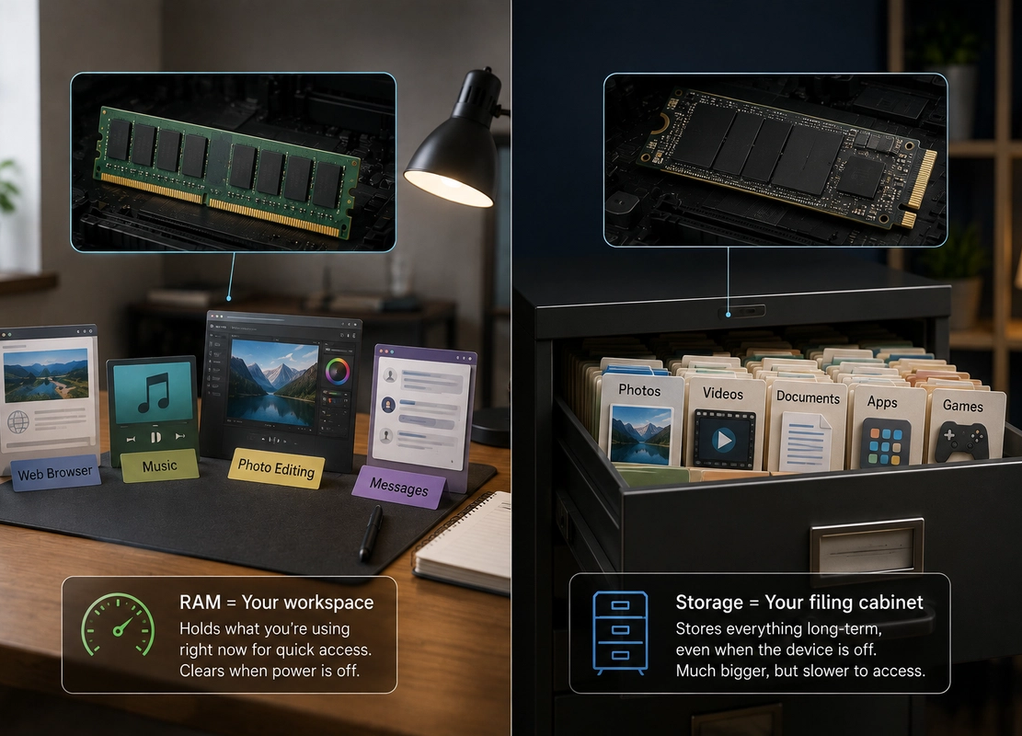
The desk itself represents RAM. You place the documents, books and tools you are currently using on top of it because they are easy to reach.
A larger desk gives you more room to work with several things at once.
Your device works in a similar way.
When you open a browser, edit a photograph or start a game, some of the information those programs need is loaded into RAM. The processor can access that information very quickly.
The more RAM available, the more information the device can generally keep ready for immediate use.
Storage is your long-term filing cabinet
Storage has a different job.
It keeps information even when you are not actively using it.
Your photographs, videos, apps, documents and operating system all take up storage space.
Using the desk analogy, storage is more like a filing cabinet beside your desk.
You can keep far more information in the cabinet than you could comfortably spread across your workspace. When you need something, you take it out and place it on the desk.
When you open an app, the device retrieves necessary information from storage and loads relevant parts into RAM so they can be used quickly.
The important difference is permanence.
Turn off your device and the information in normal RAM disappears. Your stored photographs and files remain.
More RAM helps with multitasking
Suppose you have several apps open at the same time.
You are listening to music, switching between a browser and messages, editing a photograph and occasionally checking another app.
Each active task can require RAM.
If your device has plenty available, it can keep more information ready in the background.
If RAM becomes limited, the operating system has to manage the shortage.
It may remove some background app data from RAM. When you return to one of those apps, it might need to reload instead of appearing exactly where you left it.
This is one reason devices with more RAM can feel smoother when switching between demanding applications.
However, more RAM does not automatically make every task faster.
If you already have enough for what you do, adding more may make little noticeable difference.
More storage means room for more files
Running out of storage creates a different problem.
Your device may tell you there is no space for another large game, video or software update.
Photographs and especially videos can consume substantial amounts of storage. Games and professional applications can also become extremely large.
A phone with 128 GB of storage therefore gives you much more room for files than one with 64 GB.
But extra storage does not necessarily make the phone dramatically better at multitasking.
This is where the numbers can be misleading.
Having 512 GB of storage does not compensate for insufficient RAM because the two are solving different problems.
A huge filing cabinet does not make your desk any bigger.
Speed is another important difference
RAM is designed for extremely fast access because the processor needs information from it constantly.
Storage is designed to keep much larger amounts of information over longer periods.
Modern solid-state and flash storage can also be very fast, but RAM is optimized for a different role.
This difference matters because processors operate incredibly quickly.
If the processor had to retrieve every piece of active information from slower long-term storage constantly, performance would suffer.
RAM provides a fast working area between the processor and long-term storage.
You can think of it as keeping today’s important paperwork directly in front of you instead of walking to the filing cabinet every few seconds.
What happens when you turn the device off
One of the easiest ways to understand the difference is to switch the device off.
RAM is generally volatile memory. It needs power to maintain the information it is currently holding.
When the device shuts down, that working information disappears.
Storage is non-volatile. It keeps information without continuous power.
That is why your photographs are still there when you turn your phone back on.
When the device starts again, the operating system and other necessary information are loaded from storage into RAM.
Your temporary workspace effectively gets rebuilt for the new session.
Why devices advertise storage more prominently
Storage numbers are often much larger and easier for consumers to understand.
A phone may offer 128 GB, 256 GB, 512 GB or more storage because photographs, videos and apps require significant space.
RAM capacities are usually much smaller because RAM has a different purpose.
You might see 8 GB, 12 GB or 16 GB of RAM in a device that has hundreds of gigabytes of storage.
That does not mean RAM is less important.
The numbers simply cannot be compared directly.
Eight gigabytes of RAM and 256 gigabytes of storage are not competing quantities any more than the size of your desk and the size of your wardrobe are competing measurements.
Each tells you something different about how much the device can hold.
How much of each do you actually need?
The answer depends on what you do.
Someone who mainly browses the web, sends messages and watches videos may need much less RAM than someone editing large files, running professional software or playing demanding games.
Storage depends more heavily on what you keep locally.
If you take thousands of videos, download large games or store an extensive media library, additional storage can be valuable.
If most of your files are stored in the cloud and you use relatively few large apps, you may need less.
Buying the largest number available is not always necessary.
The better approach is understanding where your current device struggles.
They work together every time you use your device
RAM and storage are different, but they constantly cooperate.
Tap an app and the device retrieves information from storage. Relevant data is placed into RAM, where the processor can access it quickly.
Use the app and new information may temporarily exist in RAM.
Save a photograph or document and that information can be written back to long-term storage.
This happens constantly without you noticing.
So when comparing devices, remember the simple distinction.
RAM is the workspace your device uses right now.
Storage is where it keeps things for later.
If your device struggles to keep multiple applications running smoothly, RAM may be part of the issue.
If it keeps telling you to delete photographs before taking another one, you probably do not need more RAM.
You need a bigger filing cabinet.