How Game Consoles Actually Work Inside
Jayda Gentry
September 1, 2026
A modern game console looks surprisingly simple from the outside. You connect it to a television, pick up a controller and select a game. Seconds later, the machine can be generating enormous 3D environments, realistic lighting, dozens of characters and complex physics while simultaneously processing your controls, playing sound and communicating with other players online.
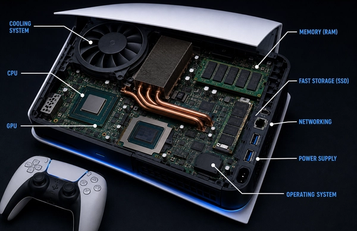
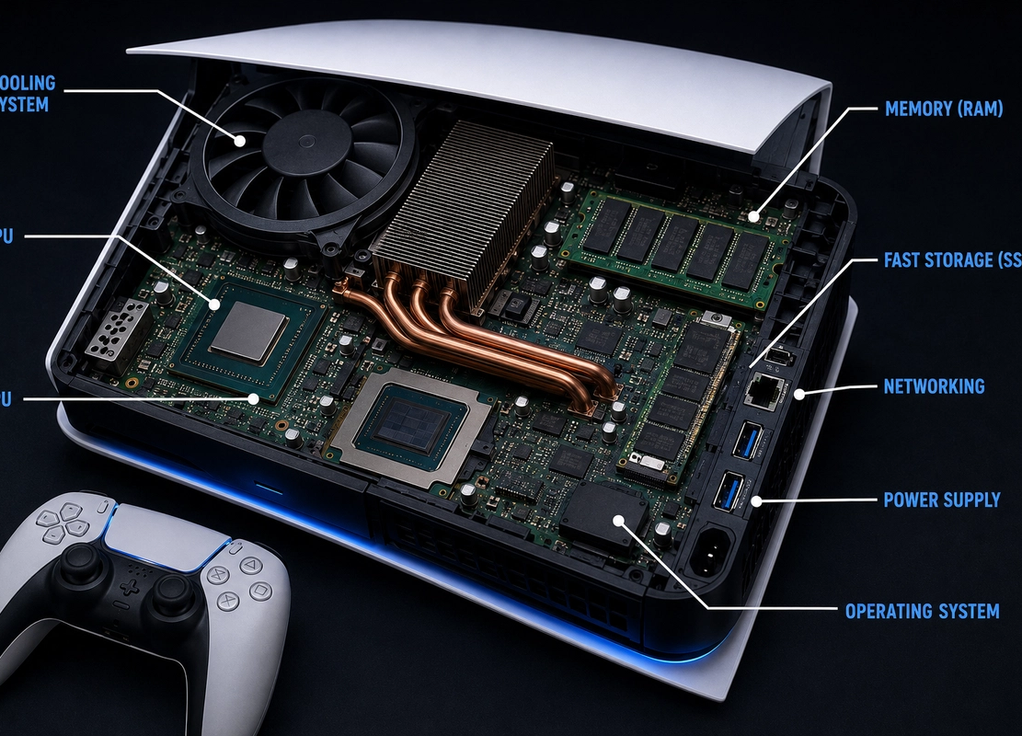
Inside, however, a console is essentially a highly specialized computer. It contains a processor, graphics hardware, memory, storage, cooling systems and networking components, all coordinated by an operating system designed specifically for gaming and entertainment.
The individual parts are not radically different from those found inside a computer. What makes a console special is how tightly the hardware and software are designed to work together for one main purpose: running games reliably and efficiently.
The CPU handles the game’s instructions
The central processing unit, or CPU, is one of the main computing components inside a console. Its job is to process instructions and perform many of the calculations required to make a game work.
Imagine walking through a busy virtual city. The game needs to determine how non-player characters behave, whether two objects have collided, what happens when you press a button and countless other details about the world. The CPU handles many of these general calculations while constantly coordinating with the console’s other components.
Modern CPUs contain multiple processing cores, allowing different kinds of work to happen at the same time. A game might be calculating physics, processing artificial intelligence and managing background systems simultaneously.
The CPU does not create the entire experience by itself, but it helps keep the logic of the game running.
The GPU creates what you see
The graphics processing unit, or GPU, specializes in producing the images displayed on your screen.
Modern games are built from enormous amounts of visual information. The console has to determine the shape and position of objects, apply textures, calculate lighting and shadows, create reflections and eventually turn all of that information into the final image shown on the television.
It then has to repeat this process many times every second.
If a game runs at 60 frames per second, the console is producing approximately 60 complete images every second while the game continues responding to the player.
Modern GPUs are designed to perform huge numbers of graphics-related calculations in parallel, making them particularly suited to this type of work. They can also support advanced rendering techniques, including forms of ray tracing that simulate aspects of how light behaves in a virtual environment.
The better the graphics hardware and the more efficiently developers use it, the more detailed and responsive those virtual worlds can become.
Memory gives games fast working space
Like phones and computers, game consoles need fast temporary memory.
This memory holds information that the CPU and GPU may need while the game is running. That could include textures, character information, parts of the current environment and other data required immediately.
The important word is immediately.
Modern games contain far more information than can practically be kept ready at every moment. The console therefore moves necessary data between storage and memory depending on what the player is doing.
If you enter a new area, the system may need to load textures, objects and other information associated with that location. Once the information is in fast memory, the processors can access it much more quickly.
Efficient memory management is one of the reasons a game can move through enormous environments without constantly stopping to load everything from scratch.
Fast storage changed how games are designed
Older consoles often relied heavily on cartridges, discs or relatively slow internal drives. Modern systems increasingly use high-speed solid-state storage.
This is not simply about making a loading screen disappear faster.
Faster storage changes how quickly game data can move into memory. Developers can potentially build environments where new assets are loaded as the player moves rather than keeping huge amounts of information ready far in advance.
This can make game worlds feel more continuous and reduce obvious interruptions between areas.
Games themselves have also become enormous. High-resolution textures, detailed audio, cinematics and increasingly complex environments can require tens or even hundreds of gigabytes of storage.
That is why storage capacity has become such an important specification when buying a modern console.
The controller is constantly sending information
Press a button on a controller and the console needs to know almost immediately.
Controllers send information about buttons, triggers, analog sticks and motion sensors to the console through a wired or wireless connection. The game interprets those signals and determines what should happen.
If you push an analog stick forward, for example, the controller sends information about the stick’s position. The game converts that input into movement, the CPU updates the character’s position and the GPU creates the new images showing the character moving through the world.
The console then sends information back to the controller in systems that support vibration, adaptive triggers or other forms of feedback.
This entire loop happens quickly enough that the experience feels immediate.
Even small delays between pressing a button and seeing the result can become noticeable, which is why input latency matters so much in gaming.
The console has its own operating system
A console does not immediately start running a game when electricity reaches its processor.
Like a computer or smartphone, it has system software that manages the hardware and provides the interface you use.
The operating system handles functions such as user accounts, storage, network connections, downloads, updates and communication between games and the console’s hardware.
It also manages background tasks.
You might download a game while playing another one, receive an invitation from a friend or capture a screenshot without leaving the game entirely. The system software coordinates those functions while attempting to keep enough resources available for the game itself.
Because console manufacturers control both the platform and much of its software environment, they can optimize the system around a relatively small number of hardware configurations.
Fixed hardware is a major advantage
PC games have to run on an enormous variety of computers. Different players may have different processors, graphics cards, memory capacities and storage configurations.
Consoles are much more standardized.
Millions of players may own essentially the same hardware configuration. Developers therefore know much more precisely what machine their game will run on.
That predictability allows them to optimize aggressively.
A developer can spend years learning exactly how to use a particular console’s hardware efficiently. This is one reason games released later in a console generation can sometimes look dramatically better than early titles even though the physical machine has not changed.
The developers changed.
They learned how to get more from the same hardware.
Cooling keeps the performance possible
Running demanding games generates heat.
The CPU, GPU and other electronic components consume electrical power, and part of that energy becomes heat. If internal components become too hot, performance can suffer and hardware can potentially be damaged.
Consoles therefore contain carefully designed cooling systems.
Heat sinks move heat away from important components, while fans push air through the machine. Some systems also use sophisticated thermal materials or other cooling techniques to improve heat transfer.
This explains why a console may become noticeably louder during a demanding game. The cooling system is working harder to remove heat.
It also explains why blocking ventilation openings or placing a console in a poorly ventilated space can cause problems.
Online gaming adds another system to the equation
When playing online, the console is not only running the game locally. It is also constantly exchanging information with servers or other players across the internet.
Suppose you are playing an online racing game. Your console needs information about what other players are doing, while their systems need information about your movements.
The game attempts to synchronize those actions even though information takes time to travel across a network.
This is where latency becomes especially important. A powerful console cannot eliminate a slow or unstable internet connection because part of the experience depends on information traveling outside the machine.
Online games therefore combine local computing power with network infrastructure that may be located hundreds or thousands of kilometers away.
A console is a computer optimized around one experience
Inside a game console, there is no single component responsible for making the game happen.
The CPU handles general instructions and game logic. The GPU produces graphics. Memory keeps important information immediately available. Storage holds enormous game files and feeds data into the system. The controller provides input, networking connects the machine to online services, and the cooling system keeps everything operating safely.
Software coordinates all of it.
What makes consoles impressive is how invisible that complexity becomes.
You do not need to decide which processor should calculate an enemy’s movement or where a texture should be stored in memory. You press a button and the game responds.
A modern console is ultimately a powerful computer designed to make an enormous amount of technical work feel like one very simple thing: playing a game.