The Difference Between Hardware, Software, and Firmware
Lilian Abbott
September 1, 2026
Every time you use a phone, laptop, television or game console, several different kinds of technology are working together.
There are the physical components you can touch, the programs that let you perform different tasks and a less visible layer of instructions helping the device itself operate.
These are hardware, software and firmware.
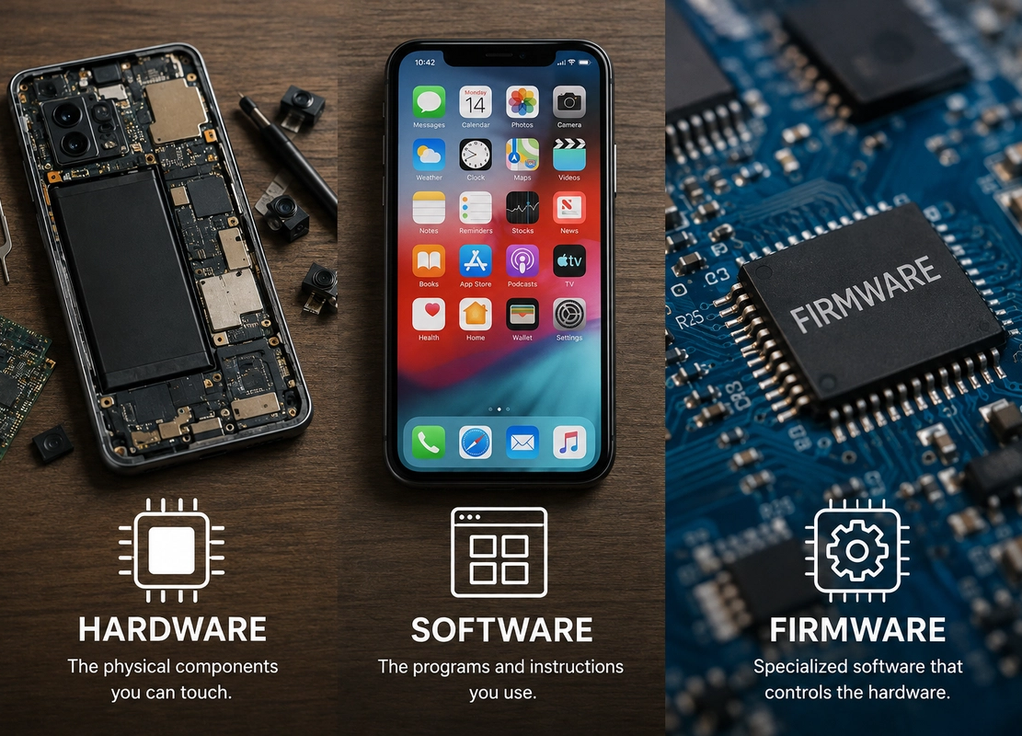
The easiest way to understand the difference is simple: hardware is the physical machine, software is what you use on it, and firmware is specialized software that helps control the hardware.
They depend on one another, but each has a different job.
Hardware is everything physical
Hardware refers to the physical components of a device.
If you can physically touch a technological component, there is a good chance it qualifies as hardware.
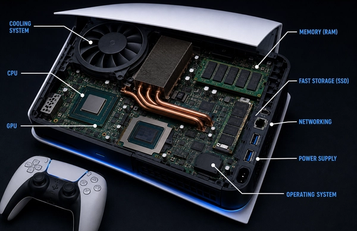
On a laptop, hardware includes the screen, keyboard, processor, memory, storage drive, battery, speakers and internal circuit boards. A smartphone has similar components packed into a much smaller space.
Accessories count too. A mouse, keyboard, printer, router and external hard drive are all hardware.
Hardware performs the physical work required for computing. The processor carries out instructions, memory temporarily holds information, storage keeps files, and the display turns digital information into images you can see.
But hardware alone is not particularly useful.
A powerful computer without instructions would simply be a collection of sophisticated electronic components. It needs software to tell those components what to do.
Software tells the hardware what to do
Software is the collection of programs and instructions that run on hardware.
Your web browser is software. So are messaging apps, games, photo editors, word processors and streaming applications.
Unlike hardware, software is not a physical object in the same sense.
You can store software on a physical drive, but the program itself consists of digital instructions and data.
When you open an app, your computer’s hardware executes those instructions. The processor performs calculations, memory holds information the app currently needs and the screen displays the results.
This relationship explains why the same physical device can perform so many completely different jobs.
A laptop can be a movie player one moment, a writing tool the next and a gaming machine later.
The hardware has not changed.
The software has.
The operating system is software too
One particularly important type of software is the operating system.
Windows, macOS, Android and iOS are operating systems. They sit between applications and much of the underlying hardware.
Imagine opening a photo-editing app.
The app does not necessarily need to independently control every tiny detail of the display, storage and other components. It can rely on services provided by the operating system.
The operating system also manages files, memory, security, connected devices and many other resources.
This is why turning on a computer involves more than simply providing electricity to its components.
The system needs to load the software that allows you to interact with the machine.
Without an operating system or another suitable software environment, most modern computers would be extremely difficult for an ordinary person to use.
Firmware sits closer to the hardware
Firmware is where the distinction becomes slightly confusing because firmware is technically a type of software.
The difference is mainly its purpose.
Firmware contains instructions closely connected to how a particular piece of hardware operates. It is commonly stored on memory built into the device itself.
Think about a wireless router.
It contains physical components, which are hardware. But those components need instructions for handling network connections, security settings and other basic operations.
Firmware helps provide those instructions.
You will find firmware in televisions, cameras, printers, headphones, game controllers, smart appliances and countless other electronic devices.
Many gadgets that do not look like traditional computers still contain firmware.
Firmware usually works behind the scenes
You interact with regular software constantly.
You open an app, close it, install another one and perhaps delete it later.
Firmware is usually much less visible.
You generally do not open your headphones’ firmware because you want to spend twenty minutes using it. It quietly manages important functions that allow the headphones to work.
A camera’s firmware may help control how the device communicates with its sensor and other components. A keyboard can use firmware to interpret key presses. A storage device can use firmware to manage how it operates internally.
The exact role varies enormously depending on the device.
The common theme is that firmware is closely tied to the hardware it controls.
It helps turn electronic components into a functioning product.
Firmware can be updated
The word firmware can make it sound permanent, but modern firmware can often be updated.
Manufacturers release firmware updates to fix bugs, improve security, add compatibility or sometimes introduce new features.
You may have updated firmware without even realizing it.
Wireless earbuds, smart televisions, routers and other devices can sometimes receive firmware updates automatically or through a companion app.
These updates can be important.
A security vulnerability in a router, for example, might require a firmware update even though the physical router itself is perfectly fine.
However, firmware updates deserve some care. Interrupting certain updates at the wrong moment can cause problems because the device is changing software that may be essential to its basic operation.
Following the manufacturer’s update process is usually the safest approach.
A smartphone uses all three at once
A smartphone provides an easy way to see hardware, software and firmware working together.
The physical screen, processor, cameras, battery and storage are hardware.
The operating system and the apps you install are software.
Underneath them, different components can rely on firmware to perform specialized hardware-level tasks.
Suppose you open the camera app and take a photograph.
The software provides the camera interface and tells the system what you want to do. The operating system coordinates access to the camera. Hardware captures and processes the information, while lower-level software and firmware help individual components function correctly.
You experience one simple action: pressing the shutter button.
The device coordinates several technological layers to make that action work.
The boundaries are not always perfectly clear
Technology categories are useful, but reality can be messier than the definitions suggest.
Firmware is software, so the distinction between the two is not absolute. Different companies may also use the terms somewhat differently depending on the device.
Modern products combine layers of hardware and software so closely that ordinary users rarely need to know exactly where one ends and another begins.
The basic distinction is still useful.
Hardware is physical.
Software provides programs and instructions that allow users and systems to perform tasks.
Firmware is specialized software closely connected to controlling particular hardware.
They are most useful when they work together
Hardware, software and firmware are not competing technologies.
They are different layers of the same system.
Great software cannot run without suitable hardware. Powerful hardware is not very useful without software telling it what to do. And many electronic components depend on firmware to handle their basic operation.
When everything works correctly, you barely notice these layers.
You tap an icon, take a photograph or connect a pair of headphones and the device responds.
That simplicity is the result of several different technologies cooperating behind the scenes.
Hardware gives a device its physical capabilities. Software gives it useful functions. Firmware helps connect those functions to the machine underneath.
Put them together, and a collection of electronic components becomes the technology you actually use.