How a Smartphone Actually Works Inside
Luna Giles
September 1, 2026
How a Smartphone Actually Works Inside
A smartphone looks like one simple device, but inside it is an extraordinary collection of tiny computers, sensors, radios and other electronic components working together.
Every time you take a photograph, open an app, unlock the screen with your face or send a message, several parts of the phone have to cooperate almost instantly.
The impressive part is how little you notice any of this.
You tap an icon and the app opens. You point the camera and a photograph appears. Behind those simple actions, the phone is processing billions of operations, moving data through memory and communicating with networks around you.
Understanding the major components makes it much easier to see how a smartphone actually works.
The processor is the phone’s main computing engine
At the center of a smartphone is its main chip, often called a system on a chip, or SoC.
Instead of using separate large components for every computing task, modern smartphones combine several important systems onto a tiny piece of silicon.
The central processing unit, or CPU, handles many of the general instructions required to run apps and the operating system. If you open a browser, calculate something or navigate through menus, the CPU is involved.
Another component, the graphics processing unit, or GPU, specializes in creating and processing visual information. It helps render games, animations, videos and other graphics.
Modern phone chips can also contain specialized processors for tasks involving artificial intelligence, photography, audio and other functions.
This specialization helps phones perform demanding tasks without using unnecessary amounts of power.
RAM gives the phone temporary working space
When you open an app, the phone needs somewhere fast to keep the information it is actively using.
That is where RAM comes in.
RAM is temporary working memory. It allows the processor to quickly access data needed by the operating system and currently running apps.
Imagine switching between your browser, messages and a music app.
With enough RAM, the phone can keep more of those applications ready in the background. If memory becomes limited, the operating system may need to remove some background information and reload it when you return.
RAM is different from the storage advertised when you buy a phone.
A phone might have 8 GB of RAM and 256 GB of storage. The RAM provides temporary workspace, while the larger storage capacity holds your photographs, apps and files over the long term.
Storage remembers your data
Internal storage is where your phone keeps information even after it is turned off.
Your operating system, installed apps, downloaded music, photographs, videos and documents all occupy storage space.
Modern smartphones generally use flash storage, which has no moving mechanical parts and can access information very quickly.
When you take a photograph, the camera system captures the image, the phone processes it and the finished file can then be written to storage.
When you open the photograph weeks later, the phone retrieves that information and displays it again.
This constant movement of data between storage, RAM and the processor happens throughout almost everything you do.
The battery powers everything
All of this computing requires energy.
Most smartphones use rechargeable lithium-ion batteries. The battery stores chemical energy and converts it into electrical energy that the phone’s components can use.
Different activities require different amounts of power.
Displaying a bright screen, playing a demanding game, recording video or maintaining a weak cellular connection can consume significantly more energy than reading a simple document.
The phone therefore constantly manages power behind the scenes.
It can reduce processor activity, limit background apps and adjust other functions to extend battery life.
Modern processors are also designed with efficiency in mind. Some contain different types of processing cores so the phone can use powerful ones for demanding tasks and more efficient ones for lighter work.
The screen is both a display and an input device
A smartphone screen performs two jobs at once.
The display creates the images you see, while the touchscreen detects where your fingers are interacting with the device.
Most modern phones use capacitive touchscreens. They detect changes in an electrical field when a conductive object such as your finger touches or approaches the screen.
The phone translates those changes into coordinates.
The operating system then determines what those coordinates mean.
If your finger touches the location of an app icon, the software interprets that as a request to open the app. If you drag your finger upward, it can interpret the changing coordinates as a scrolling gesture.
What feels like physically moving a webpage is actually a rapid conversation between sensors, software and graphics hardware.
Smartphone cameras are tiny computers themselves
Phone cameras do much more than simply capture light.
Light enters through the lens and reaches an image sensor containing millions of light-sensitive areas. The sensor converts that light into digital information.
Then substantial processing begins.
The phone may adjust color, brightness, contrast, noise and sharpness. Modern smartphones can capture several images almost simultaneously and combine information from them to create one final photograph.
This is called computational photography.
It is why a tiny smartphone camera can sometimes produce results that seem surprising given the physical size of its lens and sensor.
When you press the shutter button, you may think you captured one image.
The phone may have performed a complicated sequence of calculations to create it.
Radios connect the phone to the outside world
A smartphone contains several wireless communication systems.
Cellular radios connect to mobile networks for calls and data. Wi-Fi connects to local wireless networks. Bluetooth handles shorter-range connections to devices such as headphones, watches and cars.
GPS and other satellite navigation systems help determine location.
Near-field communication, or NFC, enables very short-range communication used for features such as contactless payments.
Each technology operates differently, but all involve transmitting or receiving information through electromagnetic signals.
Antennas built into the phone make those connections possible.
This is why designing a smartphone is not simply a matter of fitting a processor and battery inside a box. Engineers also need to position antennas so wireless systems work reliably without making the device unnecessarily large.
Sensors help the phone understand what is happening
Your smartphone constantly collects information about its physical environment.
An accelerometer detects changes in motion. A gyroscope helps measure rotation. A proximity sensor can recognize when the phone is close to your face during a call.
Ambient light sensors help adjust screen brightness.
Phones may also include barometers, magnetometers and specialized biometric sensors.
Individually, these components can seem simple.
Combined with software, they enable sophisticated behavior.
Your screen rotates when you turn the phone. Navigation apps determine which direction you are facing. Fitness apps estimate movement. The display switches off when you raise the phone to your ear.
The phone feels intelligent partly because it has so many ways to sense what is happening around it.
Software makes all the pieces work together
The hardware inside a smartphone would be difficult to use without an operating system.
Android and iOS manage the phone’s hardware and provide the environment in which apps operate.
When an app wants to use the camera, microphone, location or storage, the operating system helps coordinate that access.
It also manages memory, security, notifications, files and background processes.
This creates layers between the user and the physical electronics.
You do not need to tell the processor which calculations to perform when you take a photograph.
You simply tap the camera button.
Software translates that simple request into the enormous number of operations required underneath.
A phone is really dozens of systems pretending to be one
The most impressive thing about a smartphone may be how ordinary it feels.
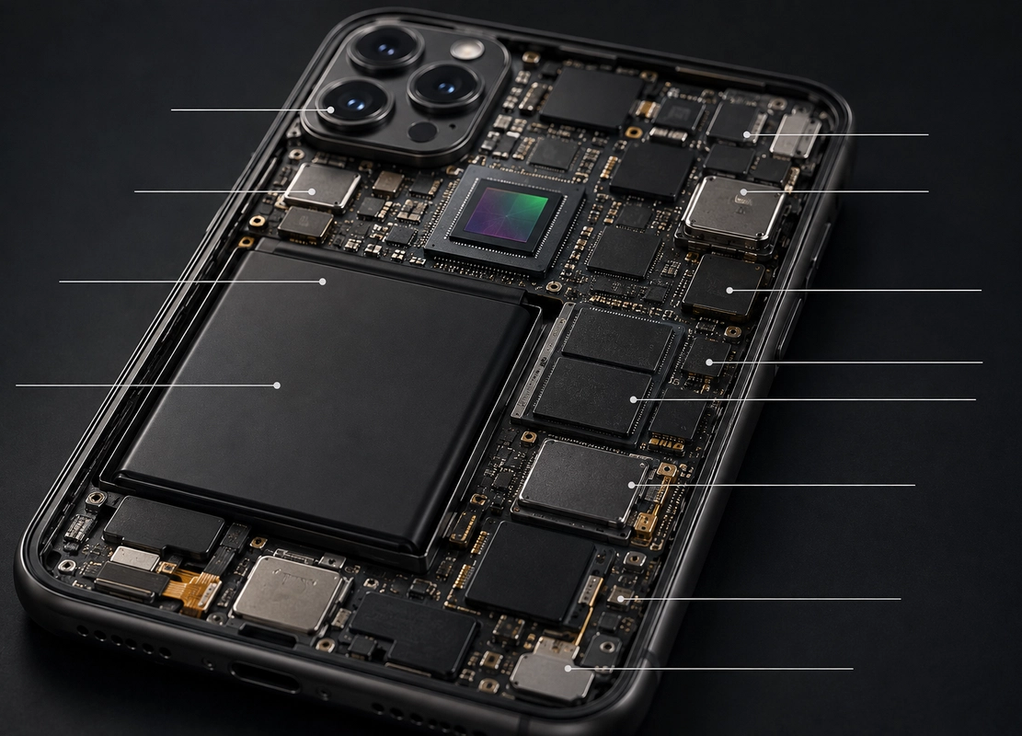
Inside are processors, memory chips, storage, cameras, antennas, sensors, speakers, microphones, charging electronics and a battery, all packed into a device small enough to fit in your pocket.
Those components constantly exchange information while software coordinates what they should do.
When everything works correctly, all that complexity disappears.
You touch a piece of glass and a photograph is taken. A song begins playing through wireless headphones. A message reaches another continent in seconds.
A smartphone feels like one object.
Inside, it is an entire collection of technologies working together quickly enough that you never have to notice them.